Inspecti
Inspecti
Redesign a mobile application that leverages AI solutions to enhance efficiency in property management.
Redesign a mobile application that leverages AI solutions to enhance efficiency in property management.
My role
My role
Product Designer
Product Designer
Team
Product manager
Developers
AI scientist
Designer
Year
Year
2024
launched
2024
launched


Apartment
Student Housing
Affordable Housing
House
Context: About Inspect-AI for property management
Inspecti is an AI-powered property inspection tool that makes inspections smoother and more accurate. Whether it's a residential home or a large commercial building, Inspect adapts to different property types, delivering precise and consistent reports.
Outcome at a Glance
As a Product Designer, I collaborated with a cross-functional team of 12, leading the end-to-end design process. I conducted user research and competitor analysis, transforming insights into actionable design decisions. This led to a complete overhaul of the user flow, wireframes, and high-fidelity designs. Additionally, I conducted usability testing to refine the final design before handing it off for development.
Apartment
Apartment
Student Housing
Student Housing
Affordable Housing
Affordable Housing
House
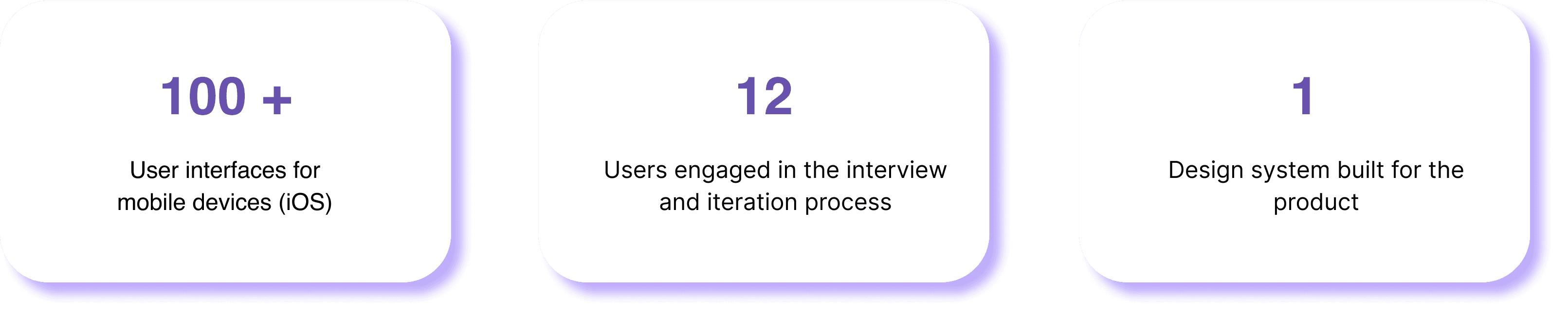
Background: Why do we need to redesign the app?
When I joined the project, the app’s basic user flow lacked efficiency and didn’t fully support inspections. The outdated UX/UI hindered AI functionality and failed to engage users.
Our goal was to streamline inspections by improving usability and AI integration, aiming for a 30% efficiency boost within six months.
Context: About Inspect-AI for property management
Inspecti is an AI-powered property inspection tool that makes inspections smoother and more accurate. Whether it's a residential home or a large commercial building, Inspect adapts to different property types, delivering precise and consistent reports.
Background: Why we need redesign the app?
When I joined the project, the app’s basic user flow lacked efficiency and didn’t fully support inspections. The outdated UX/UI hindered AI functionality and failed to engage users. Our goal was to streamline inspections by improving usability and AI integration, aiming for a 30% efficiency boost within six months.
Outcome at a Glance
As a Product Designer, I collaborated with a cross-functional team. I conducted user research and competitor analysis, transforming insights into actionable design decisions. This led to a complete overhaul of the user flow, wireframes, usability testing, and high-fidelity designs.

AI Inspection Assistant
55% Speeds up inventory checks.

Automate Report Builder
83% increased productivity.

Enhanced Efficiency 📈
The launched application leveraged AI solutions to boost efficiency by optimizing the user experience.
Design process
Design process
This experience enabled me to interact with diverse users and contribute to the full product design lifecycle, we successfully redesigned the mobile application, improving its functionality and user experience.
Discover
Feb 2024
Apr 2024
July 2024
Define
Ideate
Prototype
Usability Test
Develop
Launch
Research:
How we improve user experience to improve efficiency?
Research:
How we improve user experience to improve efficiency?
Step 1: Review and critique of the previous design
The existing product had a confusing user flow, complex interactions, unclear operation logic, and incomplete features, lacking a comprehensive onboarding interface.
Step 1: Review and critique of the previous design
The existing product had a confusing user flow, complex interactions, unclear operation logic, and incomplete features, lacking a comprehensive onboarding interface.
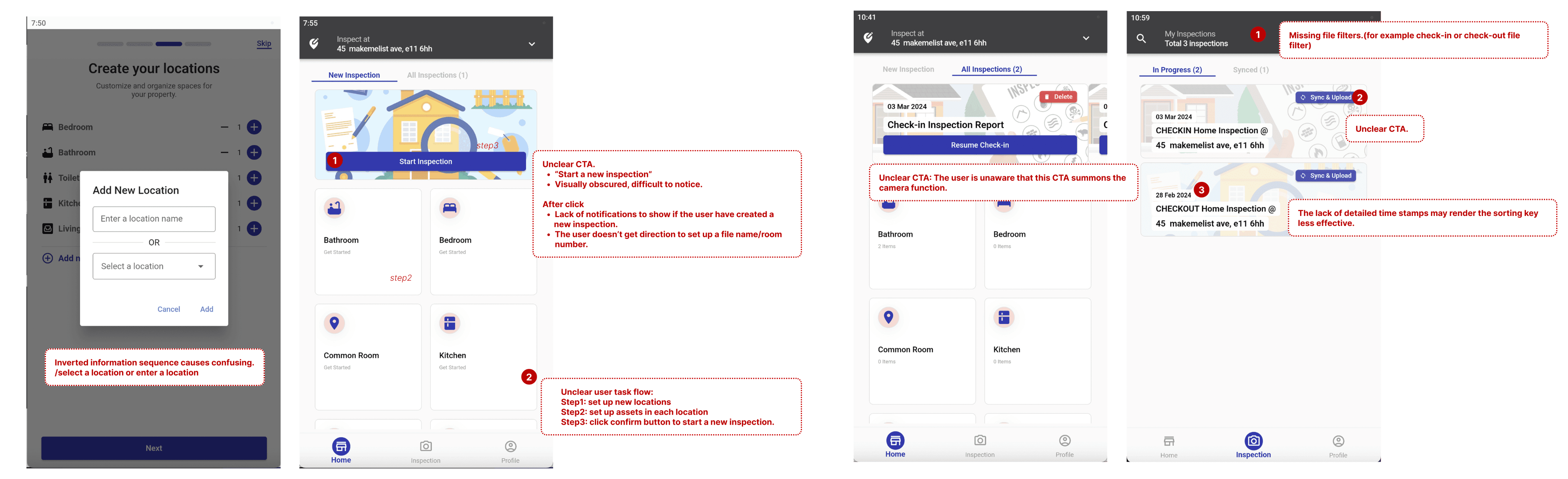
Identified two important problems
Complex User Interface
The application was hard to use, with confusing user flows and interactions. New users found it difficult to navigate and complete tasks.
Identified two important problems
Complex User Interface
The application was hard to use, with confusing user flows and interactions. New users found it difficult to navigate and complete tasks.
Less highlighting of AI Features
The AI capabilities of the product were not showcased and needed better integration and visibility in the interface.
Less highlighting of AI Features
The AI capabilities of the product were not showcased and needed better integration and visibility in the interface.
Step 2. Competitors analysis
Step 2. Competitors analysis

Interaction: Clear and simple user flows are easier to navigate, and onboarding guides greatly assist new users.
Business Perspective: Clearly defining user goals and understanding their core needs helps to meet actual user demands.
Interaction:
Clear and simple user flows are easier to navigate, and onboarding guides greatly assist new users.
Business Perspective:
Clearly defining user goals and understanding their core needs helps to meet actual user demands.
Interaction: Clear and simple user flows are easier to navigate, and onboarding guides greatly assist new users.
Business Perspective: Clearly defining user goals and understanding their core needs helps to meet actual user demands.
User insights
To know deeply about users can allowing us to develop user-centric solutions that effectively address their needs and enhance their overall experience.
User insights
To know deeply about users can allowing us to develop user-centric solutions that effectively address their needs and enhance their overall experience.
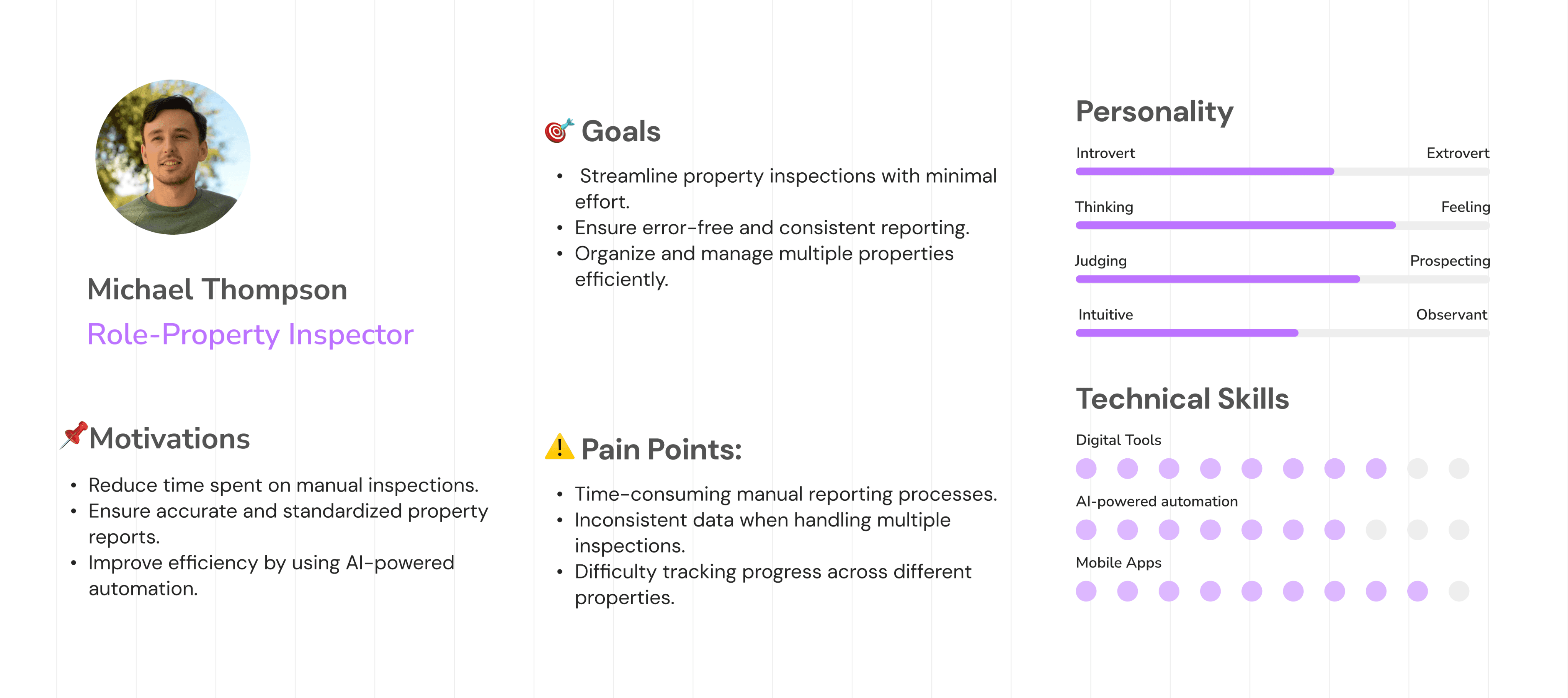
User Flow
The user can select the role to create a property based on the template and upload pictures of items. AI tech will automatically fill in the content, the user can complete the inspection, and finally sync data to the dashboard.
User Flow
The user can select the role to create a property based on the template and upload pictures of items. AI tech will automatically fill in the content, the user can complete the inspection, and finally sync data to the dashboard.

Inspect with AI
Complete your inspection
Sycn your data


Take photos of your assets

Designing for the new user journey
Designing for the new user journey
Design Guildline
Design Guildline

Design and Iterate process
Design and Iterate process
Home page
Key updates include:
Enhancing the visibility of the "Create Property" option.
Introducing a homepage feature for managing properties.
Streamlining the user flow for improved clarity and usability.
Home pageKey updates include:
Enhancing the visibility of the "Create Property" option.
Introducing a homepage feature for managing properties.
Streamlining the user flow for improved clarity and usability.
Before/After


Before/After
Before/After
Inspection replaced by report
The second change is about the Inspection, based on the user interview’s feedback, we selected the Reports instead of the Inspection.
From the reports, users can gain more institutive states of report process, which can bring users more effectivity when they use the application.
Inspection replaced by report
The second change is about the Inspection, based on the user interview’s feedback, we selected the Reports instead of the Inspection.
From the reports, users can gain more institutive states of report process, which can bring users more effectivity when they use the application.
Before/After

Design Challenge
Challenge: Enhancing the AI Solution Experience
The main challenge was designing a seamless and intuitive AI-powered experience. Through multiple iterations, we refined the process to optimize UX/UI.
3.Design Challenge
Challenge: Enhancing the AI Solution Experience
The main challenge was designing a seamless and intuitive AI-powered experience. Through multiple iterations, we refined the process to optimize UX/UI.
AI feature UX solution
📈 User Reach: 6 users ⏳ AI Scanning Time: +30s per item ⏳ Focus Time per Campaign: 90s +
A/B Testing with a design solution
📈 User Reach: 6 users
⏳ AI Scanning Time: +30s per item ⏳ Focus Time per Campaign: 90s +

Plan B ✅
✅ Faster: AI automates selection, saving time.
✅ Simpler: Reduces manual effort for users.
⚠️ Some complex items may still need manual checks.

Plan A ❌
✅ AI detects multiple items and adds descriptions.
❌ Slower: Users spend more time distinguishing items.
❌ UI with limited space.
💡 Issue: Too much information at once slowed users down.
Plan A❌
Pros: The camera detects multiple items and highlights AI descriptions.
Cons: Distinguishing items is time-consuming and slows the process.
Limited space makes it difficult for users to edit the AI-generated descriptions and with limitation of description details.
Design Deliverables
Onboarding
Design Deliverables
Onboarding
Plan B ✅
Pros: Faster Process: Eliminates manual item selection, saving time.
User-Friendly: AI simplifies tasks and reduces effort.
Cons: Edge Cases: Complex items might still require manual intervention.
Hi-Fi Design
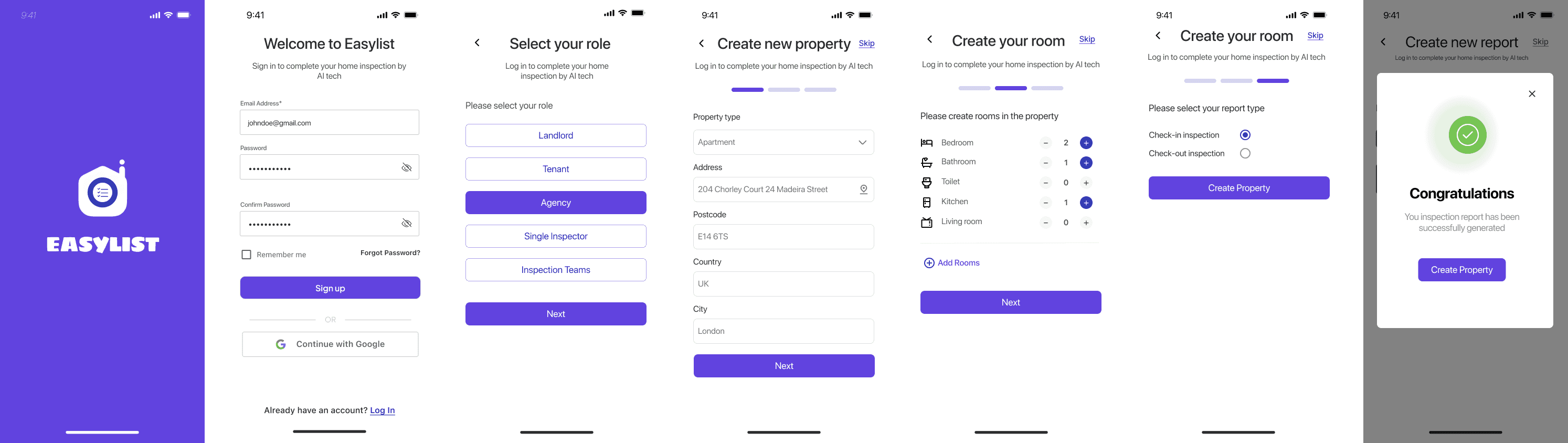
Hi-Fi Design
Hi-Fi Design


Reflection and take aways
I contributed to the full UX process, from research to prototyping and developer handoff. Working with the startup team, I learned the value of clear communication, especially in AI-driven projects, where technical constraints shape design decisions.
Next Steps
With the app launched, the focus is on gathering user feedback to drive iterations and enhance the experience, addressing past resource limitations.
Reflection and take aways
In this project, I contributed to the full UX process, including design reviews, competitor analysis, information architecture, high-fidelity designs, prototyping, and developer handoff.
Next Steps
With the app now launched, the priority is to gather more user feedback to guide iterations and improve the user experience, addressing the limitations of earlier resource constraints.