Open Text Functional testing Lab for Mobile and web
Develop, debug, monitor, and optimize applications from anywhere.

UFT Digital Lab
Open Text Functional testing Lab for Mobile and web
Develop, debug, monitor, and optimize applications from anywhere.
Develop, debug, monitor, and optimize applications from anywhere.
My Role
UX Designer
Team
Product Manager
Software Engineers
Front-End Developers
QA Engineers
Timeline
2021-2023
Company
Overview
OpenText™ Functional Testing Lab for Mobile and Web provides a centralized, enterprise-level digital lab of real mobile devices, browsers, and emulators.
How OpenText Functional Testing Lab for Mobile and Web can benefit business?
Overview
OpenText™ Functional Testing Lab for Mobile and Web provides a centralized, enterprise-level digital lab of real mobile devices, browsers, and emulators.
Overview
OpenText™ Functional Testing Lab for Mobile and Web provides a centralized, enterprise-level digital lab of real mobile devices, browsers, and emulators.

Test on more devices
Test on more devices

Increase team productivity
Increase team productivity

Eliminate machine management hassles
Eliminate machine management hassles
Main customers

Reduced mobile test maintenance by 35% with OpenText

Partnership with OpenText increase order success rate

Faster, more automated and more thorough testing with OpenText
Faster, more automated and more thorough testing with OpenText
I designed and improved core UX features.
At OpenText, I led UX design for UFT Digital Lab, collaborating with PMs, developers, and stakeholders to enhance usability and workflows. Key contributions:
🔄 Optimized Workflows
🛠️ Resolved UX Issues
🎨 Enhanced Design System
🚀 Developed New Features
I designed and improved core UX features.
At OpenText, I led UX design for UFT Digital Lab, collaborating with PMs, developers, and stakeholders to enhance usability and workflows. Key contributions:
🔄 Optimized Workflows
🛠️ Resolved UX Issues
🎨 Enhanced Design System
🚀 Developed New Features

Key modules
UFT Digital Lab allow users can test mobile and browser in the world wide, the main modules are, Dashboard, Device Lab, Apps, and Browser Lab.
Key modules
UFT Digital Lab allow users can test mobile and browser in the world wide, the main modules are, Dashboard, Device Lab, Apps, and Browser Lab.
Dashboard
The user can view the current status and condition of devices at a glance through the Dashboard‘s data visualization.
Dashboard
The user can view the current status and condition of devices at a glance through the Dashboard‘s data visualization.


Device Lab
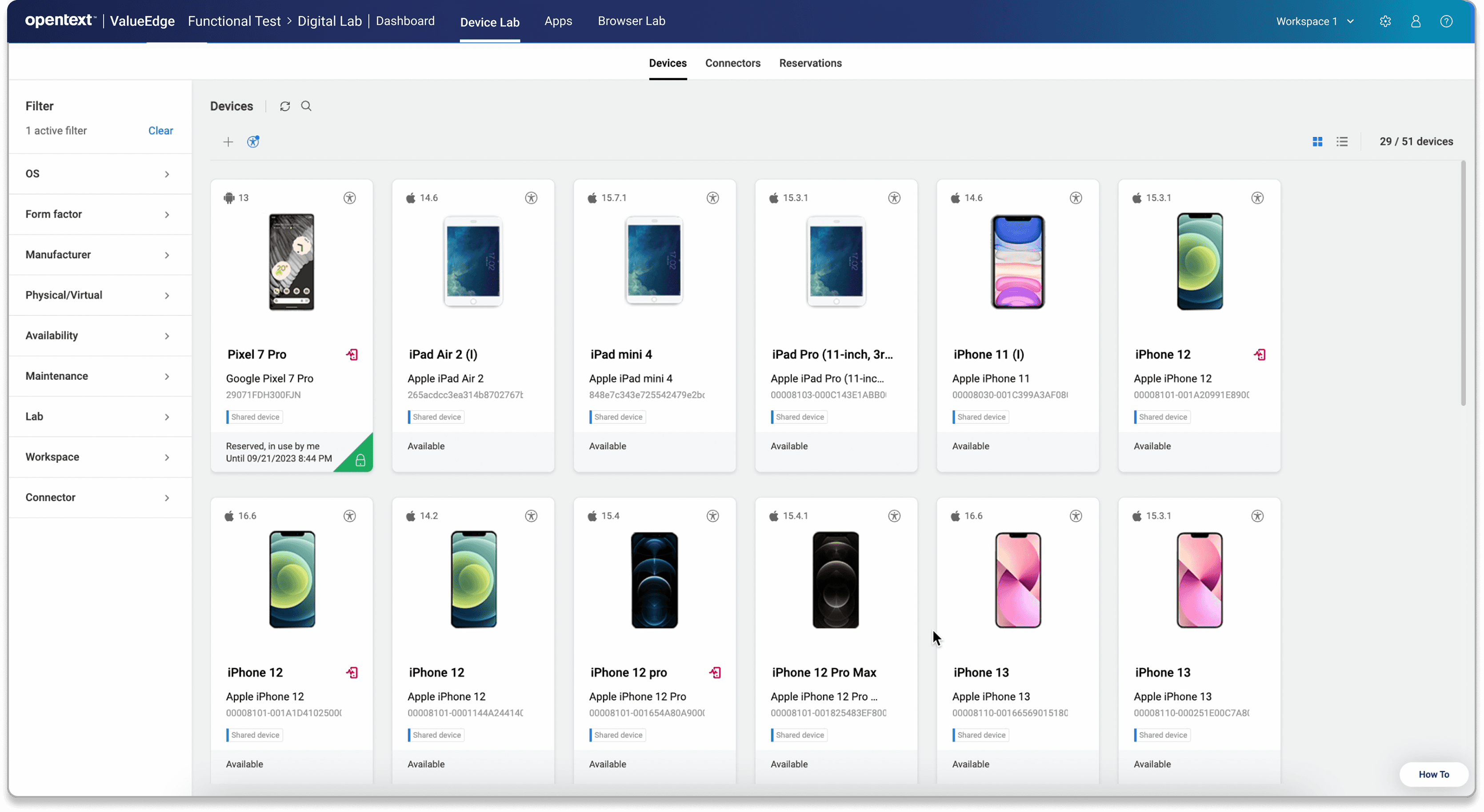
The Device Lab provides access to all devices available through cloud resources.
Device Lab
The Device Lab provides access to all devices available through cloud resources.
VNC Page
Users can operate devices through the VNC page, simulating a real mobile device experience.

VNC Page
Users can operate devices through the VNC page, simulating a real mobile device experience.
Browser Lab
The Browser Lab allows users to test browsers and includes Selenium functionality to enhance efficiency.

Watch the video to see the latest design release from my work!
This update introduces new features for the Browser Lab and accessibility functions.
Watch the video to see the latest design release from my work!
This update introduces new features for the Browser Lab and accessibility functions, along with part of the functions demo. I led the entire design process, from user research to final visual design, ensuring a seamless and user-friendly experience.
Case study-Browser Lab
Design Background: Why Added a Browser Lab?
To enhance UFT Digital Lab, we added a Browser Lab for automated web testing with Selenium. This expanded test coverage, ensured cross-browser compatibility, and provided a unified solution for both mobile and web applications.
Case study-Browser Lab
Design Background: Why Added a Browser Lab?
To enhance UFT Digital Lab, we added a Browser Lab for automated web testing with Selenium. This expanded test coverage, ensured cross-browser compatibility, and provided a unified solution for both mobile and web applications.

User research & competitor analysis
Due to time constraints, I conducted brief interviews with five internal testers and developers to uncover key user pain points and requirements. Based on those insights, I developed low‑fidelity wireframes that established both the information architecture and overall visual direction.


User research & competitor analysis
Given the turnaround, I conducted a small survey study with 15 people. Most of these individuals are testers and developers. I designed the first draft and Low-fid to define the visual style and information architecture.
Based on user interview feedback and competitor analysis, I developed the design draft concepts.
Based on user interview feedback and competitor analysis, I developed the design draft concepts.
Information Architecture & User Flows
Information Architecture & User Flows
Added Selenium script generation and Browser Lab features to highlight UFTM's capabilities.
Added Selenium script generation and Browser Lab features to highlight UFTM's capabilities.

Other contributions
In addition to UX features and updates, I contributed to design system maintenance, user research, and branding, among other tasks.
Design Systems
I consistently work on maintaining and improving our design system, ensuring a cohesive and scalable user experience across all features and updates.


Step 1. Click the Accessibility button to open the accessibility module.
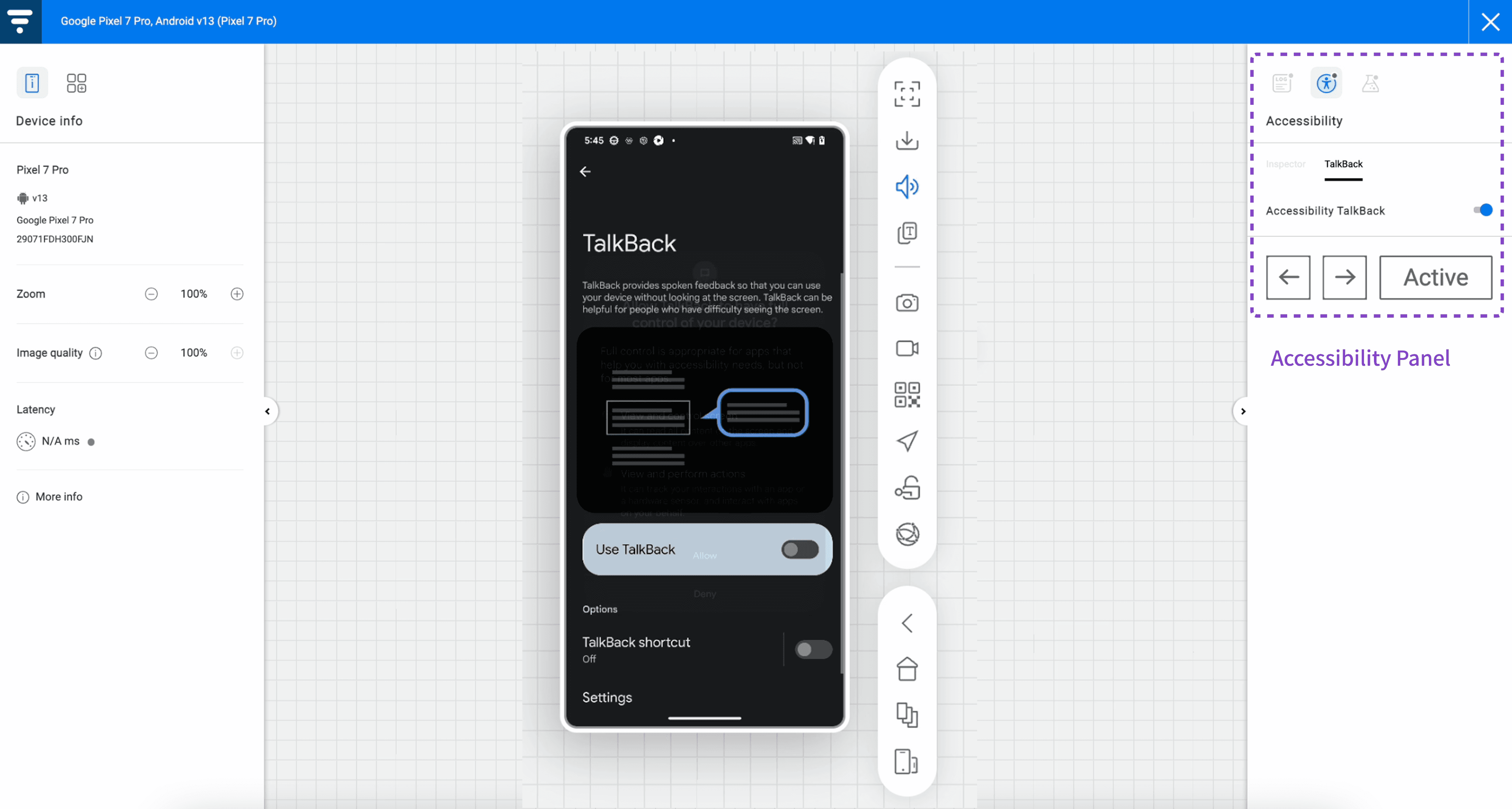
Step 2: Navigate to the VNC page and enable accessibility on cloud devices.
Users can interact and hear voice feedback based on their selection.
Case Study – Accessibility in the VNC Page
To make our product more inclusive, we enhanced accessibility features to improve usability for people with disabilities. These updates follow WCAG standards, ensuring a more accessible and user-friendly platform.
Final Design


Design Solution
Final Design
Final Design
High-fidelity prototypes with Browsers and Generate Script.
High-fidelity prototypes with Browsers and Generate Script.

👀 Watch the demo video showcasing the outcomes of adding Browser Lab and Accessibility Testing Mode.
Case Study – Accessibility in the VNC Page
To make our product more inclusive, we enhanced accessibility features to improve usability for people with disabilities. These updates follow WCAG standards, ensuring a more accessible and user-friendly platform.
High-fidelity prototypes with Browsers and Generate Script.
High-fidelity prototypes with Browsers and Generate Script.
Final Design
Step 1. Click the Accessibility button to open the accessibility module.
Step 2: Navigate to the VNC page and enable accessibility on cloud devices.
Users can interact and hear voice feedback based on their selection.
Other contributions
In addition to UX features and updates, I contributed to design system maintenance, user research, and branding, among other tasks.
Design Systems
I consistently work on maintaining and improving our design system, ensuring a cohesive and scalable user experience across all features and updates.
Design Systems
I consistently work on maintaining and improving our design system, ensuring a cohesive and scalable user experience across all features and updates.
User Research
During the design process, I led user research to gather feedback and identify user pain points, improving the platform's experience. I utilized both quantitative and qualitative research methodologies to ensure data-driven design decisions.
User Research
During the design process, I led user research to gather feedback and identify user pain points, improving the platform's experience. I utilized both quantitative and qualitative research methodologies to ensure data-driven design decisions.

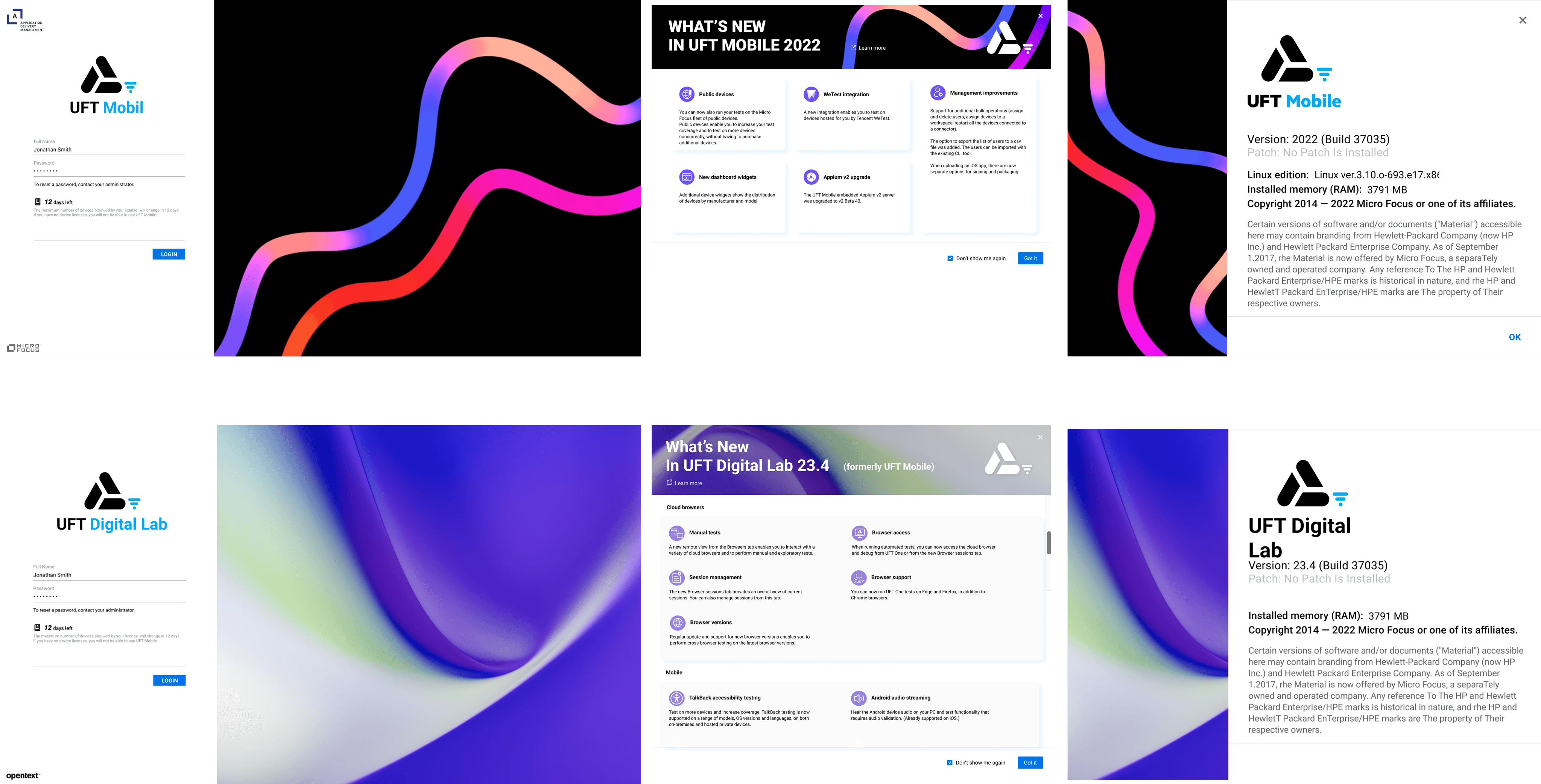
Branding and graphic work


Takeaways
Aligning Design with Business Goals
In my two years at UFT Digital Lab, I learned the importance of integrating business objectives into the design process to ensure both user satisfaction and strategic success.
Significant UX Contributions
While the Cloud Browser feature is a key highlight of my work, I have also played a crucial role in various other projects, enhancing the overall platform functionality and user experience.
Aligning Design with Business Goals
In my two years at UFT Digital Lab, I learned the importance of integrating business objectives into the design process to ensure both user satisfaction and strategic success.
Significant UX Contributions
While the Cloud Browser feature is a key highlight of my work, I have also played a crucial role in various other projects, enhancing the overall platform functionality and user experience.